
To import a previously exported project (refer the Backing up API Projects section), click the Add icon and click the From Zip option.
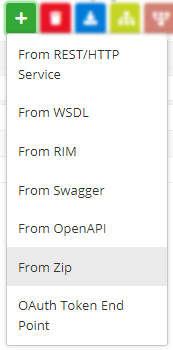
Figure 1: Navigating to import a previously exported project

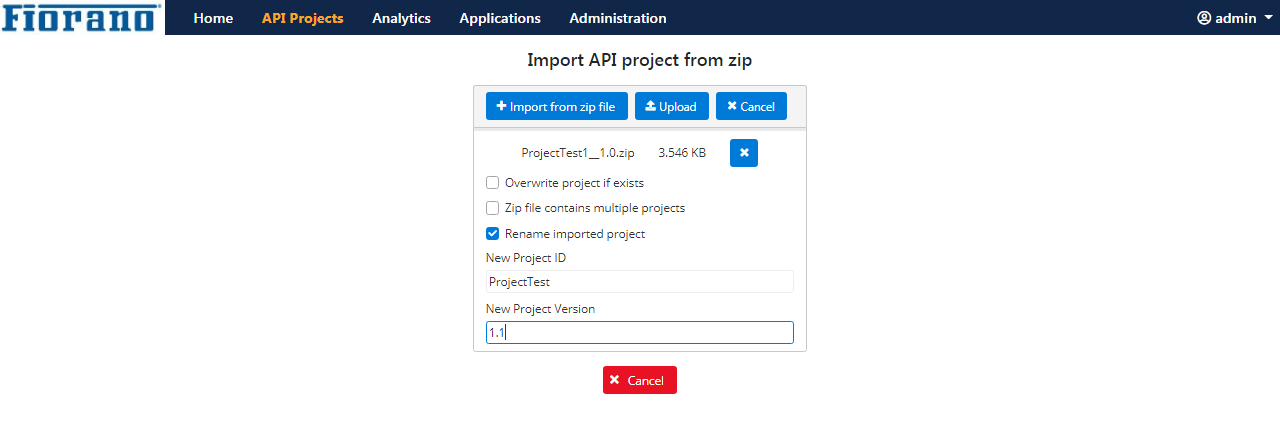
Figure 2: Import Project dialog box to browse exported project to import
-
Click the Import from zip file button to choose the project from the location where it is saved.
-
Select the following options as required
-
Overwrite project if exists: Select this option if the project being imported is already present but needs to be overwritten.
-
Zip file contains multiple projects: Select this option if the zip file has more than one project.
Ensure selecting the option if the zip file contains multiple projects.
-
Rename imported project: Select this option to import a project with a different name or/and version number.
-
-
Click the Upload button.