
Predefined Time Period
API Management provides predefined options of Time Period such as:
-
Last Hour
-
Last 24 Hours
-
Last Week
-
Last Month
-
Date Range
The first four options are fixed time options, whereas the last option is a user-defined time option to pick the desired time period by choosing the start and end date.
When the Date Range option is selected, a calendar is displayed using which the Start and End dates may be specified.

Figure 1: Time Period and Data Aggregation (refer the below section) options in the Analytics page
Data Aggregation
Depending on the time period selected, a Data Aggregation option is also available (refer the figure above) to group the data to further narrow down the data analysis:
-
By Minute (this option is available for only Last Hour and Date Range time periods)
-
By Hour (this option is not available for the Last Hour and Last Month time periods)
-
By Day (this option is not available for Last Hour and Last 24 Hours time periods)
-
By Week (this option is only available for Last Month and Date Range time periods)
Below is a Line chart for a specific date range selected grouped for the By Week date aggregation.
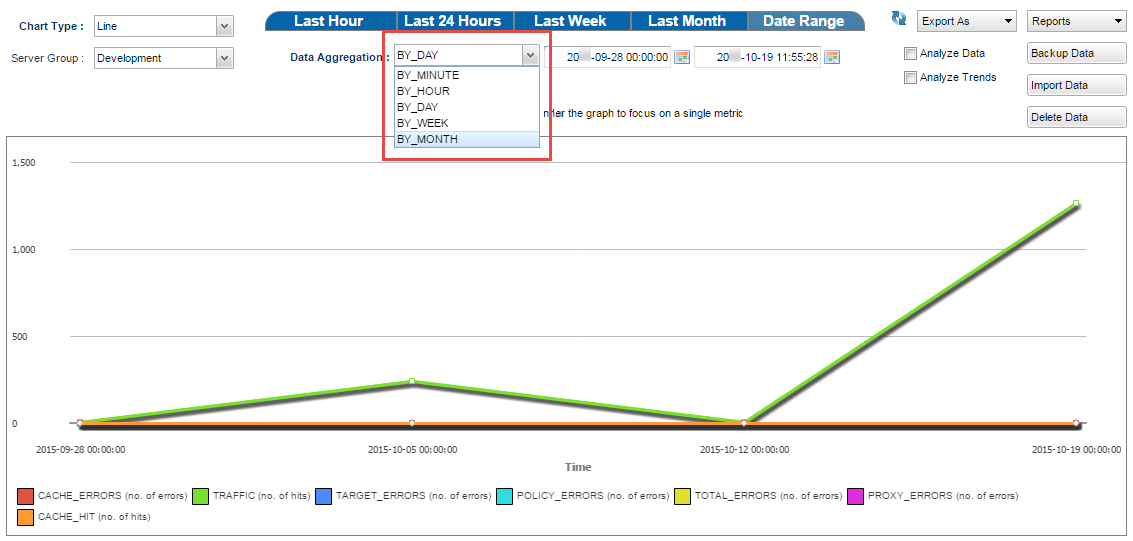
Figure 2: Analytics section with the Date Range time period and Per Week data aggregation selected