
Analytics data can be backed up, imported and deleted altogether. Buttons present below the Reports button on the upper-right part of the screen help to backup, restore and delete the analytics data. Sections below explain the same:
Backup Data
This feature enables storing a copy of Analytics Data for a specified period.
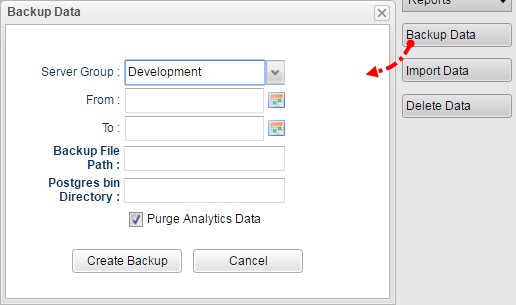
Figure 1: Attributes required to backup data
|
Properties |
Description |
|
Server Group |
Name of the environment from where the data backup needs to be done. |
|
From and To |
Specify the date range for which the data backup needs to be done. |
|
Backup File Path |
Location where the backup data needs to be stored along with the file name. D:\AnalyticsBackup\Data1.bkp |
|
Postgres bin Directory |
Location of "bin" directory in the Postgre installation path. C:\Program Files\PostgreSQL9.5.5\pg95\bin |
|
Purge Analytics Data |
Deletes the data from the system after taking the copy of the same. |
Import Data
Imports the data that is backed up using the Backup Data feature explained in the section above.
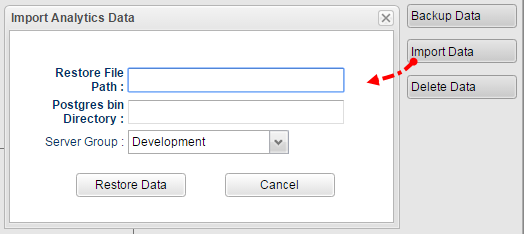
Figure 2: Attributes required to import data
|
Properties |
Description |
|
Restore File Path |
Location of the backed up data file. D:\AnalyticsRestore\Data1.bkp
|
|
Postgres bin Directory |
Location of "bin" directory in the Postgre installation path. C:\Program Files\PostgreSQL9.5.5\pg95\bin |
|
Server Group |
Name of the environment to which data needs to be imported. |
Delete Data
Erases the data completely for the period specified.
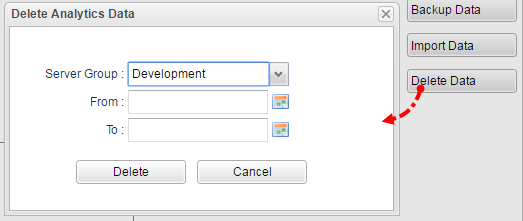
Figure 3: Attributes required to delete data