
-
Launch the Fiorano eStudio. Open the Profile Manager, and open the profile whose thread management policy is to be modified.
-
Navigate to the Connection Manager instance in the profile. As with the default profile, this is at the node Fiorano > socketAcceptors > port-1 > Connection Manager.
-
From the list of dependencies, right-click on SocketReadHandler, and select Locate in Tree to reach the instance of SocketReadHandler used by the connection manager.
-
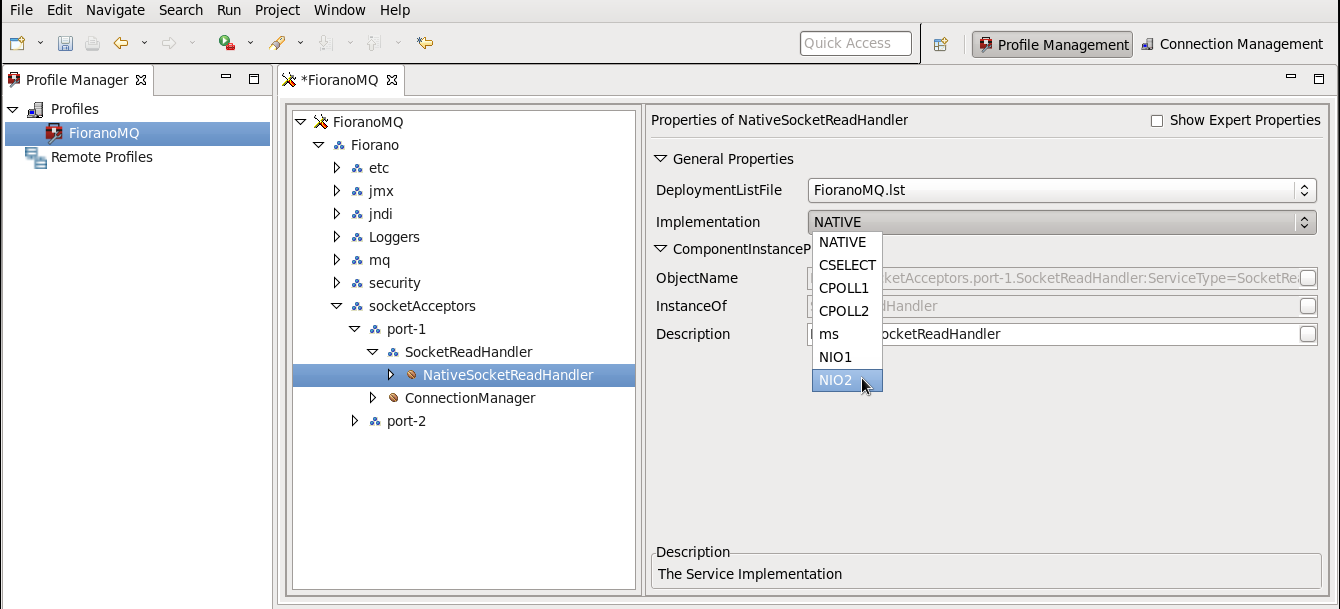
In the Properties of the NativeSocketReadHandler pane, select NIO2, from the drop-down list of the Implementation options, as shown in the figure below.
-
Right-click the FioranoMQ node, and select the Save option from the pop-up menu. Then run the server.