
LDAP (Lightweight Directory Access Protocol) is an application protocol for querying and modifying attributes in directory service providers like Active Directory (AD), which supports LDAP.
Active Directory is a database-based system that provides authentication, directory, policy, and other services in a Windows environment.
This section explains the Access and Layout information pertaining to the directory server, which is required to authenticate and authorize users using LDAP Directory Server.
Prerequisite
If the User that is used to connect to the LDAP server has read-only permissions, then create 'admin' user and 'administrator' group manually. By default, Fiorano Server tries to create admin/administrator for internal use.
To use a different User other than Admin/Anonymous to create internal server connections, the user credentials have to be changed in all the places where it is being used. Refer to the Editing configurations after changing Admin Password section for details.
Configuring Fiorano Servers to use LDAP
By default, to store user credentials, file-based datastore is used by Fiorano servers. To use an existing LDAP/AD as a datastore, the same needs to be configured in the server profiles as well, which is explained in the following sections.
If servers are configured with LDAP, then during login, user authentication is done against the details present in the LDAP server. All users that are shown in the Dashboard/eStudio will be fetched from the LDAP server. Any new User/Group that is created gets stored in the LDAP server. By default, admin user and administrator group will be created and added to the LDAP datastore during server startup.
Following are the configuration steps:
-
Open the Profile Management perspective in eStudio.
-
Right-click the Profiles node in the Profile Manager tab and select Load Profile > Fiorano ESB > profile1 > FES.
-
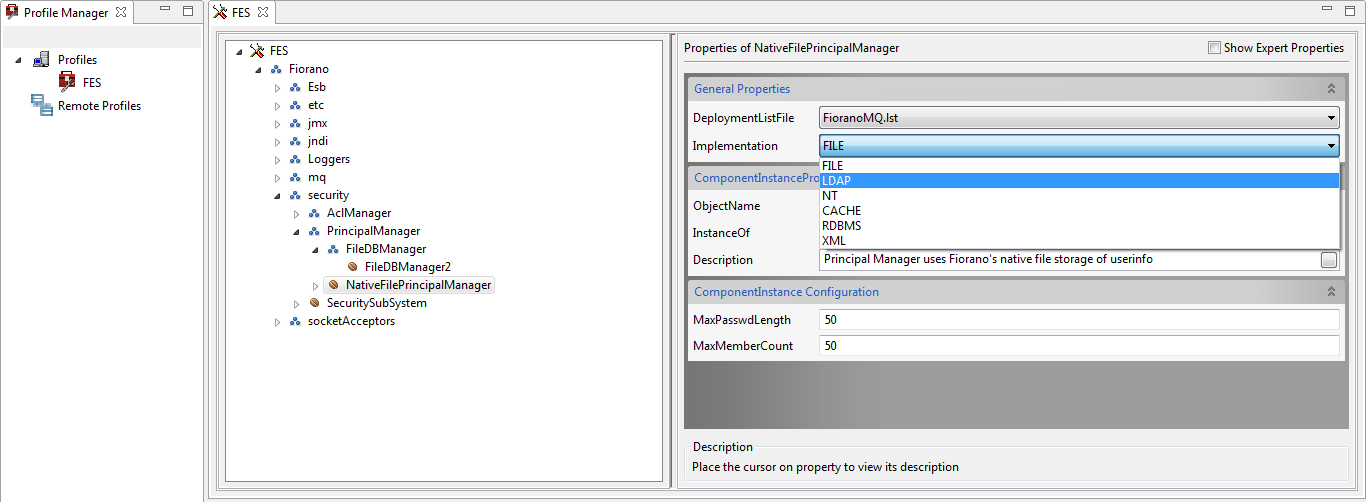
Go to Fiorano > security > PrincipalManager > NativeFilePrincipalManager.
-
Select the 'LDAP' option from the Implementation property drop-down in the Properties panel on the right side panel.
-
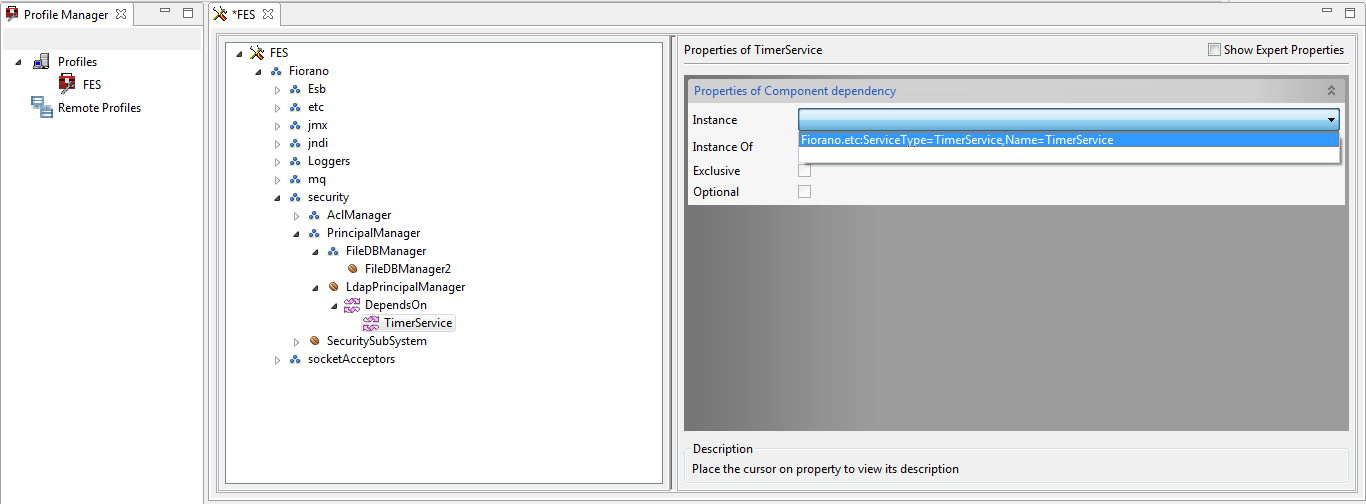
In the PrincipalManager node, go to LdapPrincipalManager > DependsOn > TimerService and select 'Fiorano.etc:ServiceType=TimerService,Name=TimerService' from the Instance drop-down.
-
Go back to the LdapPrincipalManager node and provide the LDAP server configuration in the Properties panel on the right side.
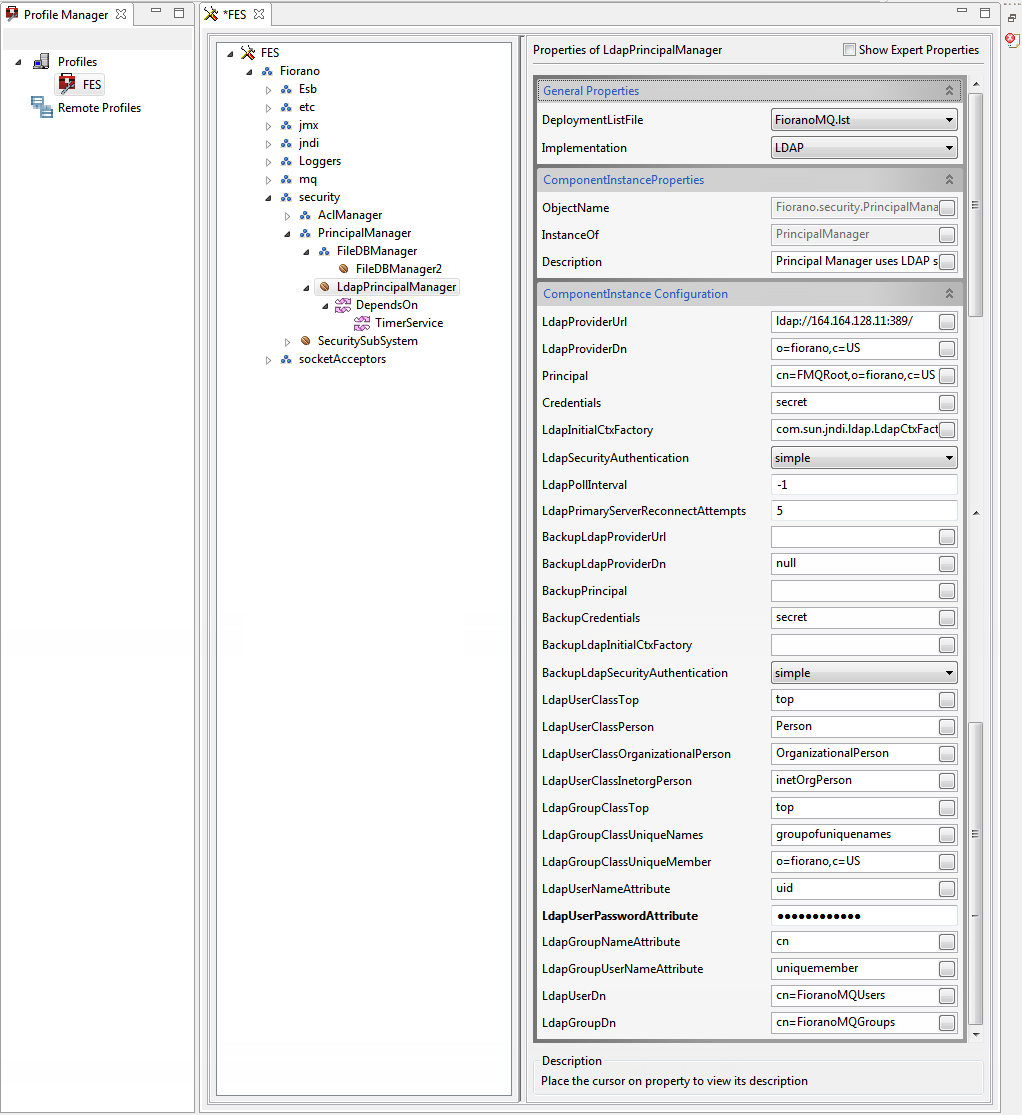
Descriptions of the attributes are listed below.
-
|
Attribute |
Description |
|
LdapProviderUrl |
LDAP Server's connect URL. "ldap//<ip of server>:389" (389 is the default port for LDAP). |
|
LdapProviderDn |
Points to the base domain of LDAP server under which Fiorano Server would create its repository. |
|
Principal |
LDAP server's username. This username will be used to connect to the LDAP server. |
|
credentials |
LDAP server's login password. |
|
LdapInitialCtxFactory |
Class name for LDAP server's Initial Context Factory to be supplied to Initial Context. |
|
LdapInitialContectDn |
Points to the location at which principals would be stored. |
|
LdapSecurityAuthentication |
LDAP Security Authentication in use. |
|
LdapPollInterval |
Interval (in msec) after which the LDAP server connection is polled. A negative value disables polling. |
|
LdapPrimaryServerReconnectAttempts |
Number of reconnect attempts the LDAP primary server makes. |
|
LdapUserClassTop |
LDAP User Class Top. |
|
LdapUserClassPerson |
LDAP User Class Person. |
|
LdapUserClassOrganizationalPerson |
LDAP User Class Organizational Person. |
|
LdapUserClassInetorgPerson |
LDAP User Class InetorgPerson. |
|
LdapGroupClassTop |
LDAP Group Class Top. |
|
LdapGroupClassUniqueNames |
LDAP Group Class Unique Name. |
|
LdapGroupClassUniqueMember |
LDAP Group Class Unique Member. |
|
LdapUserNameAttribute |
LDAP User Name. |
|
LdapUserPasswordAttribute |
LDAP User Password. |
|
LdapGroupNameAttribute |
LDAP Group name. |
|
LdapGroupUserNameAttribute |
LDAP Group UserName Attribute. |
|
LdapUserDn |
LDAP User distinguished name. |
|
LdapGroupDn |
LDAP Group distinguished name. |
Optional Attributes
|
Attribute |
Description |
|
BackupLdapProviderUrl |
The backup LDAP server provider Url, which is tried when the primary LDAP server becomes unavailable. |
|
BackupLdapProviderDn |
Points to the base domain of LDAP server under which FMQ would create its repository |
|
BackupPrincipal |
Backup LDAP server's username. This username will be used to connect to the backup LDAP server. |
|
BackupCredential |
Backup LDAP server's login password. |
|
BackupLdapContextInitialCtxFactory |
Class name for backup LDAP server's Initial Context Factory to be supplied to Initial Context. |
|
BackupLdapSecurityAuthentication |
Get the backup LDAP server security authentication. |
Configuring LDAP for AclManager
To use LDAP server to store user permissions, enable LDAP for ACL Manager in the Server profiles by performing the following actions:
-
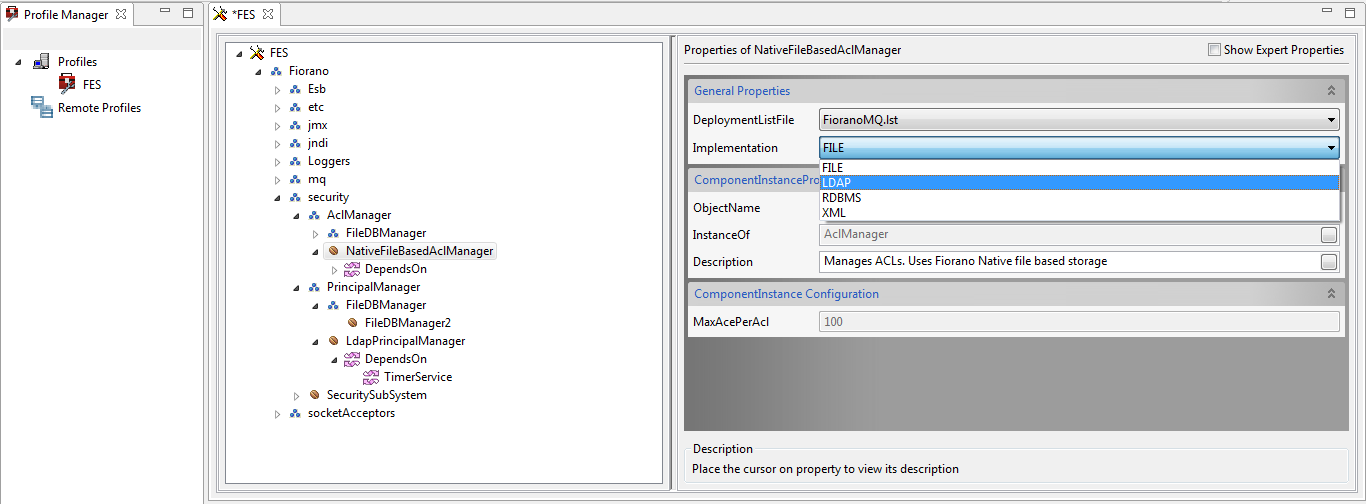
Go to Fiorano > security > AclManager > NativeFileBasedAclManager and select the 'LDAP' option from the Implementation drop-down.
-
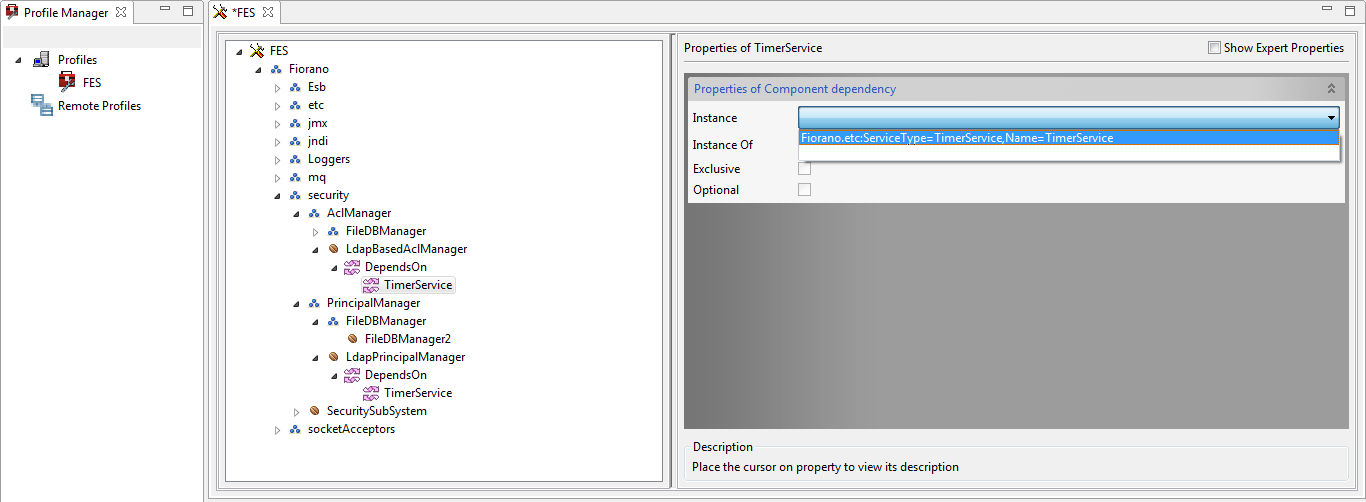
In the AclManager node, go to LdapBasedAclManager > DependsOn > TimerService and select 'Fiorano.etc:ServiceType=TimerService,Name=TimerService' from the Instance drop-down.
-
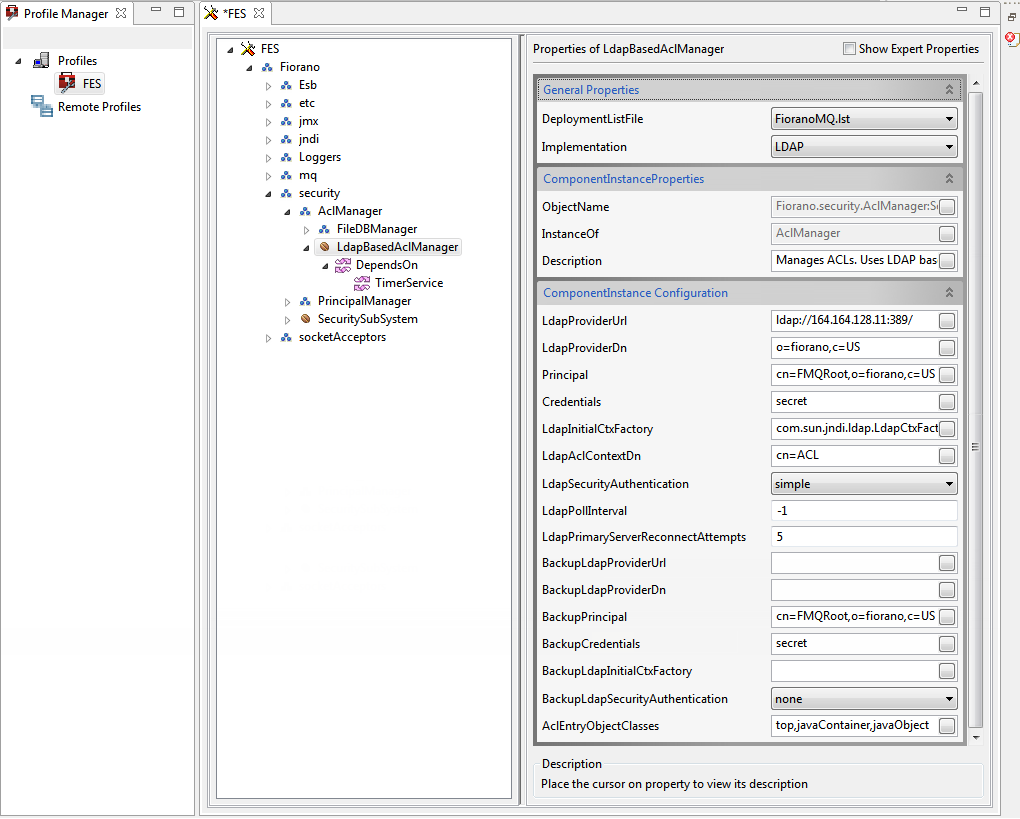
Go back to the LdapBasedAclManager node and provide the LDAP server configuration in the Properties panel on the right side.
|
Attribute |
Description |
|
LdapProviderUrl |
Primary LDAP Server's connect URL. "ldap//<ip of server>:389" (389 is the default port for LDAP). |
|
LdapProviderDn |
Points to the base domain of LDAP server under which FMQ would create its repository. |
|
Principal |
LDAP server's username. This username will be used to connect to the LDAP server. |
|
credentials |
LDAP server's login password. |
|
LdapInitialCtxFactory |
Class name for LDAP server's Initial Context Factory to be supplied to Initial Context. |
|
LdapInitialContectDn |
Points to the location at which Acls would be stored. |
|
LdapSecurityAuthentication |
LDAP Security Authentication in use. |
|
LdapPollInterval |
Interval(in msec) after which the LDAP server connection is polled. Negative value disables polling. |
|
LdapPrimaryServerReconnectAttempts |
Number of reconnect attempts LDAP primary server makes. |
|
AclEntryObjectClasses |
Comma separated object class names for an ACL entry in the LDAP provider. |
Optional Attributes
|
Attribute |
Description |
|
BackupLdapProviderUrl |
The backup LDAP server provider Url, which is tried when the primary LDAP server becomes unavailable. |
|
BackupLdapProviderDn |
Points to the base domain of LDAP server under which Fiorano Server would create its repository. |
|
BackupPrincipal |
Backup LDAP server's username. This username will be used to connect to the backup LDAP server. |
|
BackupCredential |
Backup LDAP server's login password. |
|
BackupLdapContextInitialCtxFactory |
Class name for the backup LDAP server's Initial Context Factory to be supplied to Initial Context. |
|
BackupLdapSecurityAuthentication |
Gets the backup LDAP server security authentication. |
-
In case of HA servers, the LDAP configuration needs to be configured in both Primary and Secondary profiles.
-
Since Enterprise server synchronizes the user data with the peer server, Configuring LDAP for peer server is not required.
-
If credentials of a user are changed, edit all the places where the same is configured. Refer the Editing configurations after changing Admin Password section for details.