
As SSL support is provided for Jetty, you can configure the SSL parameters for Jetty running with FES/FPS by editing the corresponding profiles.
Configuring SSL parameters for Jetty
By default, the SSL property for Jetty is disabled. To enable this property, perform the following actions:
-
Go to the eStudio application and open the FES profile from Profile Management perspective before starting the FES server.
-
Navigate to Esb > Jetty, and select the SSLEnabled properties checkbox.
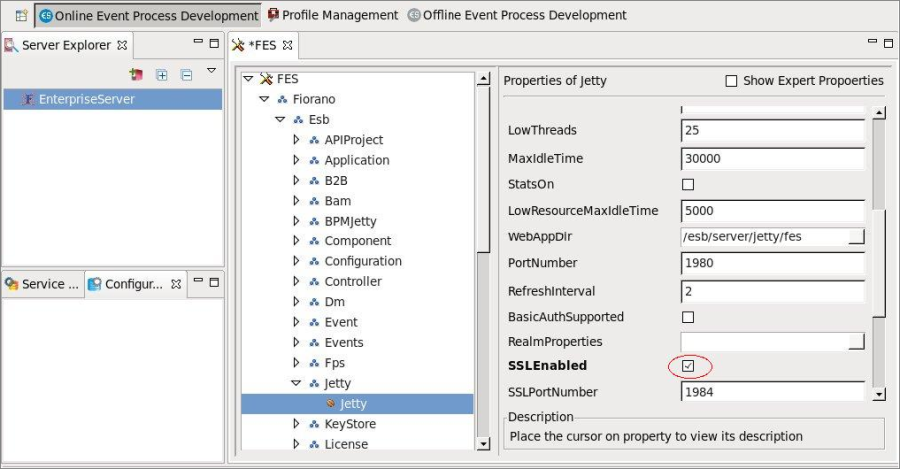
Figure 1: Configuring Jetty for FES
-
Specify the values for KeyStoreLocation, KeyStorePassword, KeyPassword, TrustStore, TrustStorePasswd and save the FES profile.
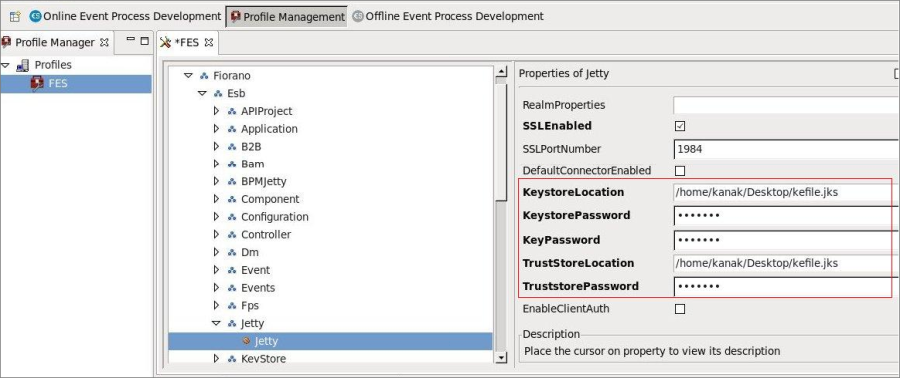
Figure 2: Configuring Jetty for FES
-
Start the servers. Jetty gets started with the SSL enabled.
To apply the same configuration in FPS server, open the FPS profile and follow the same steps as mentioned above.