API Management
13.2 13.1 13.0 12.2 12.1 12.0 11.0
13.2 13.1 13.0 12.2 12.1 12.0 11.0

Json Web Token policy

Json Web Token policy generates a signed JSON Web token with a provided set of claims and header.

Configuration

The properties that have to be configured to use the policy are described below.
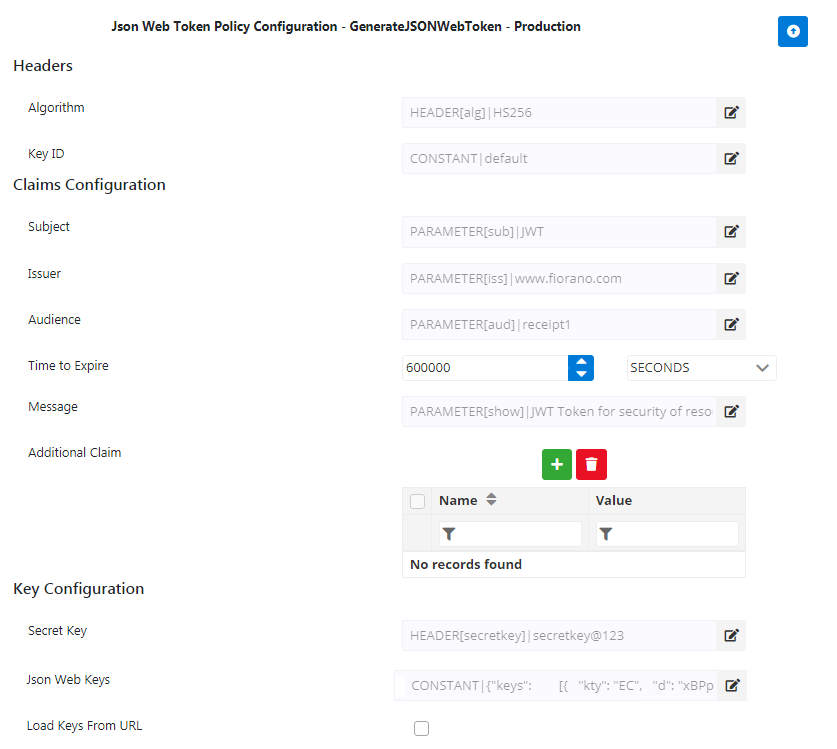
JWT1.png
Figure 1: Json Web Token policy configuration attributes

Property

Description

Headers
Algorithm

Specifies the encryption/signed algorithm to encrypt/sign.

Supported algorithms are HS256, HS384, HS512, RS256, RS384, RS512, PS256, PS384, PS512, ES256, ES384, ES512 , NONE.

Provide any of the above-mentioned algorithm values as input to be used to generate a token.

  • For HS algorithm, has to be provided.

  • For RS/PS/ES algorithm, Key ID and have to be provided.


Key ID

The Key ID value corresponding to the algorithm (specified in the Algorithm property above) as provided in the Json web keys or the keys exposed in the (described below).

Claims Configuration
Subject

The "sub" claim represents the subject of the JWT being issued.

This property is optional.

Issuer

The "iss" (issuer) claim identifies the entity that issues the JWT.

This property is optional.

Audience

The "aud" claim identifies the intended audience/recipients of the JWT. The audience value is comprised of comma separated string.

This property is optional.

Time to be expired

The expiry time of the token is that after which the token stands invalid.

Message

The message that needs to be displayed.

This property is optional.

Additional Claim

This is to provide custom claims other than the above properties. Each claim's value is source-configurable which means the value can be dynamically populated accordingly from the source chosen which can be Context variable/Header/Parameter/Constant.

Key Configuration
Secret Key

Provide when a symmetric algorithm like HS256 is specified. The minimum length of the string has to be 256,384,512 bits for HS256,HS384,HS512 respectively.

Json Web Keys

Provide when an asymmetric algorithm like RS256 or ES256 is specified. A sample is as shown below:

{"keys":
       [{
  "kty": "EC",
  "d": "xBPpZeelxp-D1ScZWV6bbVB5ZN-qU508CDP9f4VVyq8",
  "use": "sig",
  "crv": "P-256",
  "kid": "1",
  "x": "sBNgwW1i-A62HVWQZxN0Z57ZZ3adKFji2AyXAUH2j-s",
  "y": "fHyE4jHp1YYpoKUcrokfN7E7CmxQLysUT4-Y9ub0wJo",
  "alg": "ES256"
},
{
  "p": "2d_twBKnXTZQMfF4c2_aYIkQ4Jl-8TyTZGNwMi5Zz0SBZabVOM7AjlQv6Wf1BW12vNXf10xasVKC27DIUSKwG1_I402g08h552IITuv8TuIJ1FOLTHq5pLt64fQ70xAvRtGH1jFJGI_AjQVGpL8xBgvypzGHbcY6VCv1iwCcnOc",
  "kty": "RSA",
  "q": "yPUw_j-W3Qn7TD-fjZ1AO9rLcqrBKb_LtnDrVMrCNosuhdX4GSEry-EnaH_vWYIgDQm0diSN0BVRDpdig6kysfFBruxUPO-vIFCCLK3DMIiaCoDuVZC32EwOgLM8c1IhGEoPDMJJqluzJReQ_41L_ZuyuAE68q99woTckFEOcCE",
  "d": "PoRmjr9OswJxPF-dyylI6ZrfLg5YLCi1gbEjHy_wyOiY9UI65ajrSl9yTlL3Ke410HCch51CxR3a2M6cuJdIq7RrfcqccEwb-E6XFdH18vWgshuoROcmS0Xqw6i9DMHhXdyl31HocQT5odXQibER7ntlXI5B6wwJzoL8cnsNhpDLW9uwkNHdCOnnGsRS8meIPQA5yOJatzqdfb276Z7RRPBEbRYosYGcr9n8o5nqBO3jPaZpEocS66-gFmAMwkZW6Em8eFUhzKAedKP-KbdN8e3Lzf8qBmrQPsVxI3IYVfhiW6xgcx4QF4zCcz-8NXFGYlaR6y3G7QKXJhGQsSPfAQ",
  "e": "AQAB",
  "use": "sig",
  "kid": "2",
  "qi": "AgP527wlrvRxazuh5CY2UynVWrL9H8kFWUqxux2dnLjaH9hg_7RbT_tCJg9_DQiIuOtMQl14eqMvSL246VCY4fhZxFqLA1QqVlC3OpbX7VWYYj5aWz_bmcoSCpxGvC2tTFg3VRs8upYd5UrcJXXEbnGYhsVS2fWmUX3WcPotoU0",
  "dp": "CykCR61s70Rh9Tz2O4uGNx2uRKL4Mqk0r5a8X4WqSgirTCawk1lb2a6MSbtufJmv1FpsPd4GY0DjvRcgG6_YL37HjoUicNa7D9QgstI5uVywvjSNVRyQN9T2pW5aRiR1F36SI7GgmeZ7KX4UsUmt3C5ufov18PSPdlJOIJGmdA8",
  "alg": "RS256",
  "dq": "hBggD1AvU7aG-DTuJUFTgsSsbQBvHolTV-Zb2o25Ie9VMmZWwfX6-vZSWC-YXobZmJhjhjE7Aqewc13xRMhIaY1Ddr8kFDYdMKmbF9FUd6ejUfo0MAyDvGsqMVEgEFHRLU0pHWLs102VsXEPP9xaMidRUACHBhVzHhUFgtu1GOE",
  "n": "qweevvZFA-bpSiv3DaA1jDOPE9mYlXIwlYH0Hs8kYpW2iocpVVEu10sRSbS97P4-pljKswkLcDZfDPejZ97X5PQ8jPPtTwqahxoGdXl6mkMmFT-AdG5m3tUFMGHO5uWxFwSy-R2eqHkq8i_8O7ByjUlZSzoo4NEpGvAWdPHv3BUl-zIciWj-DZaCutrasf9-_LjKiX-0q8-z8i9umfz6Wl5VjWorrUQAzShDTdLR6F02e8mMleJdnV8tEi6KceXkbU15q4xG-0pcgv3sov8kNjtgmggaN8dkQRbpx9zEI__X5-WqvIB1RO0n4BUPhBKeus5TCN2rrZph7dNVRHdJxw"
}       ]
     }


For the JWK structure as in the sample above, refer to the link: https://tools.ietf.org/html/rfc7517


Alternatively, the Json Web Keys can be provided in the following ways:

  • If the Json Web Keys have to be fetched from a File Store, a Callout policy can be used.

  • If the Json Web Keys are exposed in an HTTPS URL (Eg: https://www.googleapis.com/oauth2/v3/certs), enable the Load Keys From URL property (see below) and provide the URL in property.


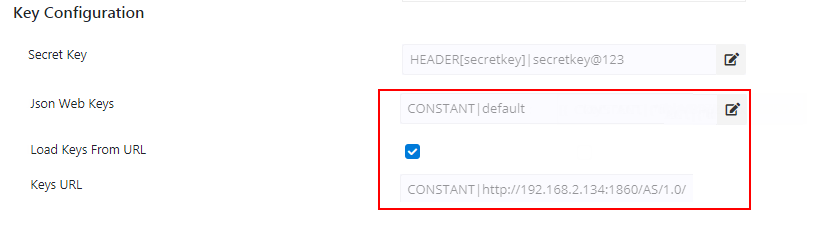
Load Keys From URL

If Json Web Keys are exposed in a specific URL, then enable this property.

JWT2.png image2019-11-18 15:18:4.png

Keys URL

Specify the URL in which Json Web Keys are exposed.

Creating a JWT policy

Generate token using postman.

Request
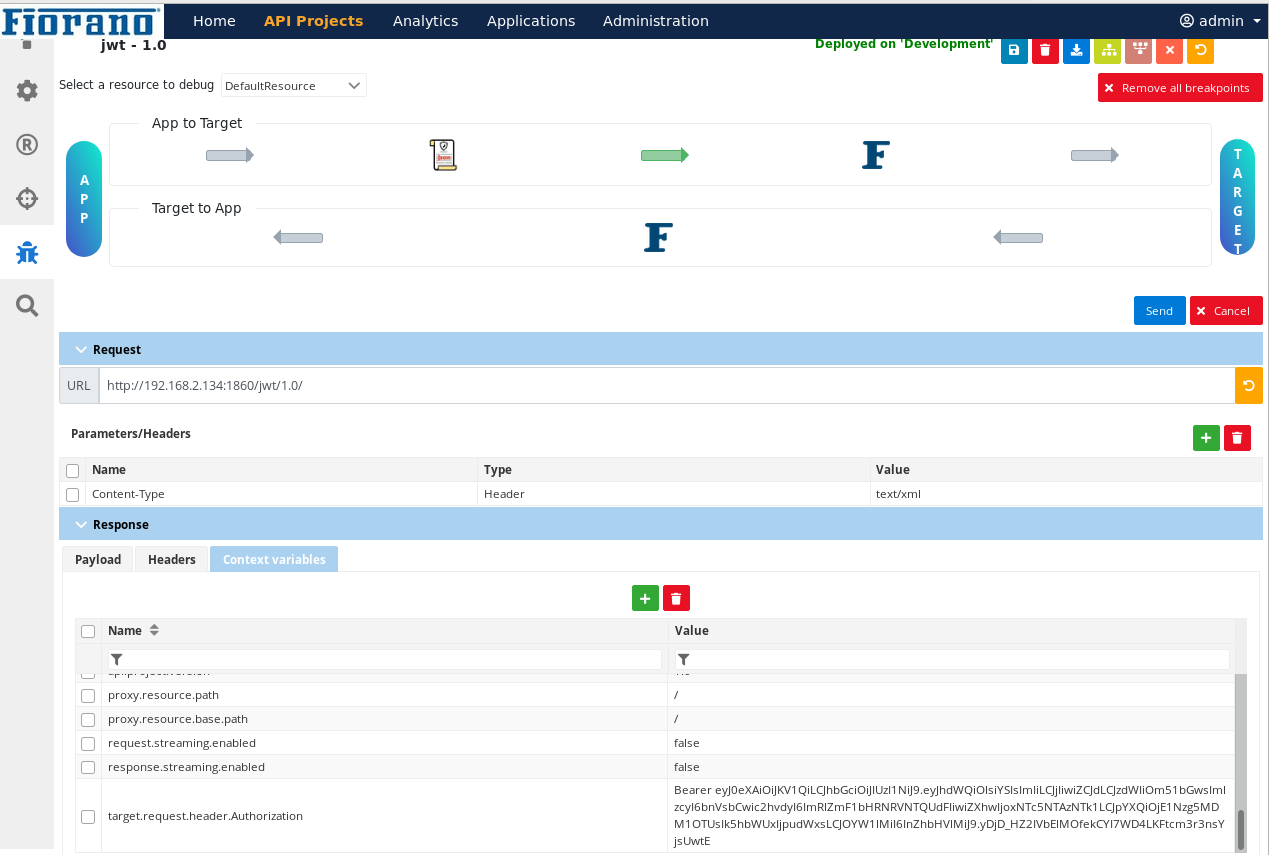
curl -X GET \  http://192.168.2.134:1860/jwt/1.0/
Response

The generated JWT along with prefix "Bearer " is populated  into context variables under the name "target.request.header.Authorization".
  jwt_targetreqAuthHEADER.png