
The MSMQReceiver component is used to receive messages from MSMQ. The name of the queue from which a message needs to be retrieved can be specified using the CPS.
Points to Note
-
This component runs only on the Windows Platform.
-
This component does not support a 64-bit JDK; please use a 32-bit JDK to run it.
-
If a queue specified in the CPS does not exist in a local or remote MSMQ server, it is not automatically created.
Configuration and Testing
The MSMQ server and queue can be configured in the connection properties panel of the Configuration Property Sheet (CPS).
Managed Connection Factory
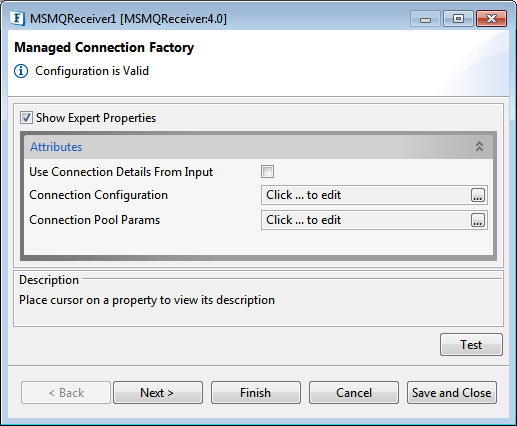
Figure 1: Managed Connection Factory in MSMQReceiver CPS
Please refer to the respective sections on the MSMQSender4.0 page for information about the properties Use Connection Details From Input, Connection Configuration, and Connection Pool Params.
Interaction Configurations
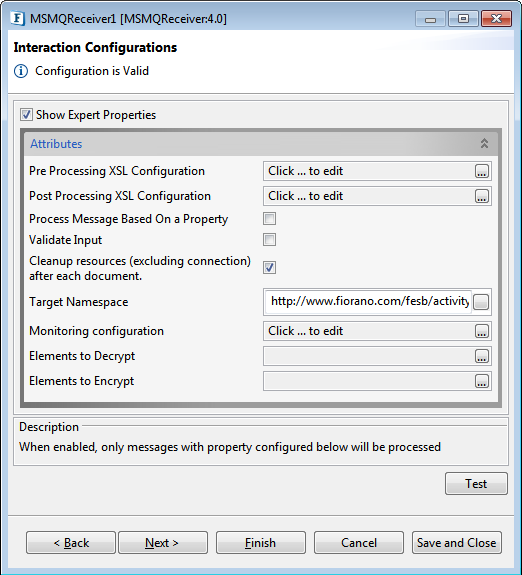
Figure 2: Interaction Configuration panel
Pre Processing XSL Configuration
Pre Processing XSL configuration can be used to transform request message before processing it. Click the ellipses button against the property to configure the properties.
Refer to the Pre/Post Processing XSL Configuration section under the Common Configurations page for details regarding Pre Processing XSL configuration and Post Processing XSL configuration (below).
Post Processing XSL Configuration
Post Processing XSL configuration can be used to transform the response message before sending it to the output port.
Process Message Based on Property
The property helps components to skip certain messages from processing.
Refer to the Process Message Based On a Property section under the Common Configurations page.
Validate Input
If this property is enabled, it validates the input request with the input port XSD.
Refer to the Validate Input section under the Common Configurations page.
Cleanup resources (excluding connection) after each document
This closes all the resources except for the connection used by MSMQReceiver4.0 after every request. If the less processing time is more important the less memory usage, then it is recommended to disable this property and vice versa.
For more details, refer to the respective section under in the Common Configurations page.
Target Namespace
Refer to the Target Namespace section under the Common Configurations page.
Monitoring Configuration
Please refer to the Monitoring Configuration section in the Common Configurations page.
Elements to Decrypt
Select elements to decrypt in the Input Message.
Refer to the Encrypt Decrypt Configuration section in the Common Configurations page for details.
Elements to Encrypt
Select elements to encrypt in the Output Message.
Refer to the Encrypt Decrypt Configuration section in the Common Configurations page for details.
Scheduler Configuration
Please refer the respective section in Common Configurations page.
Error Handling
Please refer Error Handling section Common Configurations page for details.
Input and Output
Input Schema
There is no input schema for this adapter.
When the property Use Connection details from input is chosen, the following input schema with the element ConnectionFactorySettings is generated. Properties that are used to create the connection are present under this element.
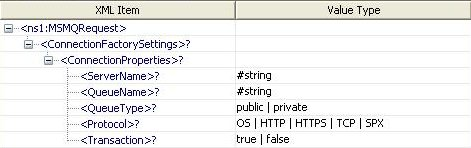
Figure 3: Input schema with ConnectionFactorySettings
Output Schema
There is no output schema for this adapter.
Functional Demonstration
Scenario 1
Receive messages from a local MSMQ Server.
Configure the MSMQ Receiver as described in Configuration and Testing section and use feeder and display component to send sample input and check the response respectively.
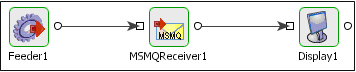
Figure 4: Configuration the MSMQ Receiver
Sample Input

Figure 5: Demonstrating Scenario 1 with sample input
Sample Output

Figure 6: Demonstrating Scenario 1 with sample output
Use case scenario
In the revenue control packet example the transaction file details are received from an MSMQ server from where they are picked up by other applications for processing.
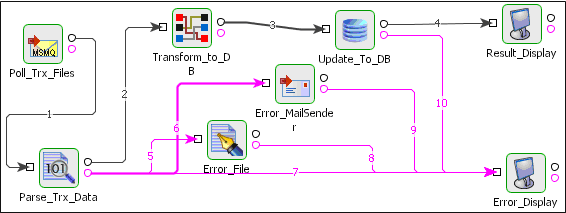
Figure 7: Revenue control packet
The event process demonstrating this scenario is bundled with the installer. The bundled process shows it as a File Reader component instead of a MSMQ Receiver component.
Documentation of the scenario and instructions to run the flow can be found in the Help tab of the flow in eStudio.