
Installing Fiorano Platform
To install the Fiorano Platform on Mac OS platform, perform the actions below:
-
Download the latest Fiorano Installer from http://www.fiorano.com/downloads/fiorano-platform/
-
Select 'Mac' while downloading.
-
Once the file is downloaded, check its integrity by following the steps in the Verifying Installer Integrity section.
-
-
Double-click the file or execute the command below to install the Fiorano Platform.
tar xvfz fioranoX.X.X_bXXXX_macosx-cocoa.tar.gz
Prerequisites for eStudio
Before launching eStudio
Perform the following actions before launching eStudio to setup the Java Home path correctly:
-
Go to %FIORANO_HOME%/eStudio/eStudio.app/Contents and open the Info.plist file.
-
Add the following string:
<string>-vm</string> <string>%JAVA_HOME%/bin/java</string>If eStudio does not start by adding the above script, please replace the line with the below script:
<string>-vm</string><string>%JAVA_HOME%/jre/lib/server/libjvm.dylib</string>
After launching eStudio
Perform the following actions right after launching eStudio to setup the Java Home path:
-
Open eStudio and go to Windows > Preferences > Java > Installed JREs.
-
Click Add, provide the JAVA_HOME path and click Apply.
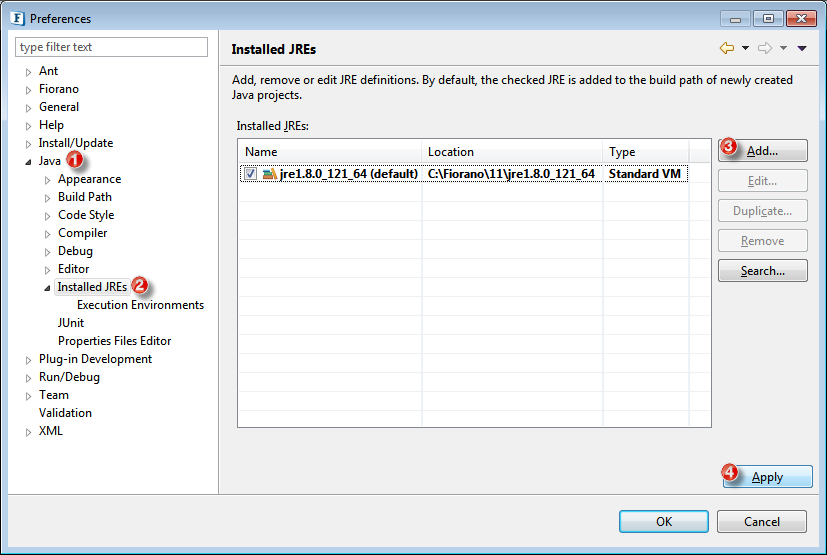
-
Go to the Compiler option under the same subsection "Java".
-
Choose the respective JDK version from the Compiler Compliance level drop-down.
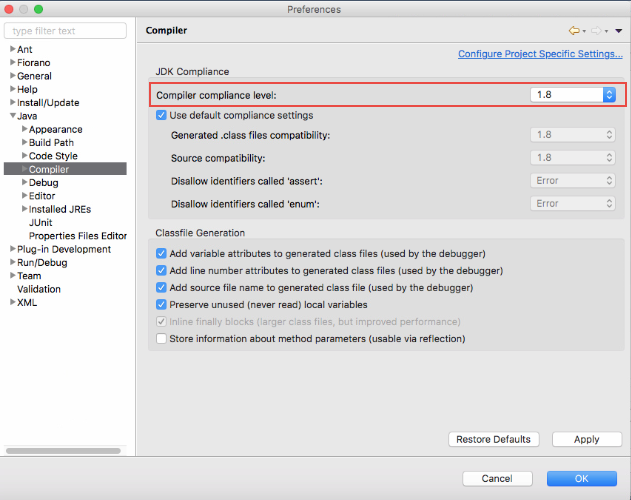
Setting Java runtime library for mac
Edit the global.properties file before creating a custom microservice.
-
Go to %FIORANO_HOME%/antscripts and open the global.properties file.
-
Provide the JAVA_HOME path for the mac.jre.lib.dir property under the line "# path to the java run time library for mac" replacing the existing one - "/System/Library/Frameworks/JavaVM.framework/Versions/CurrentJDK/Classes".
mac.jre.lib.dir=/Library/Java/JavaVirtualMachines/jdk1.8.0_131.jdk/Contents/Home
Adding additional System Properties
Perform the following actions to add additional system properties:
-
Go to %FIORANO_HOME%/eStudio/eStudio.app/Contents and open the Info.plist file.
-
Add the following string:
<string>-vmargs</string>
<string>-D<Property>=value</string>
Example
Erlang<string>-vmargs</string> <string>-DBYPASSNONPRIMITIVES=true</string> -
Save the Info.plist file.
Post Installation Reference
-
To migrate from an older Fiorano version to the new one, follow the steps mentioned in the Migration Across Releases section.
-
For details on how to start and use the Fiorano ESB Servers, please refer to the Developing section.