
Additional information or any particular remarks regarding the Event Process can be added to a document and attached to the Event Process for future reference purposes. This document can be later downloaded to view as well as edit its content. It can be used as a checklist file and a reference document to refer modification history. it will be helpful for a third person as well as the author to understand and keep track of the details of any event process after a period of time.
Multiple documents of different formats can be added to the event process.
To add a particular document, perform the following actions:
-
Create the document to be saved with the required information and save it in a chosen location.
-
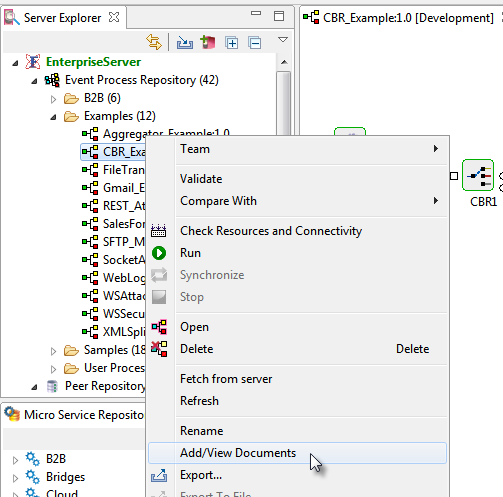
Right-click the Event Process from the Server Explorer panel and click the Add/View Documents option.
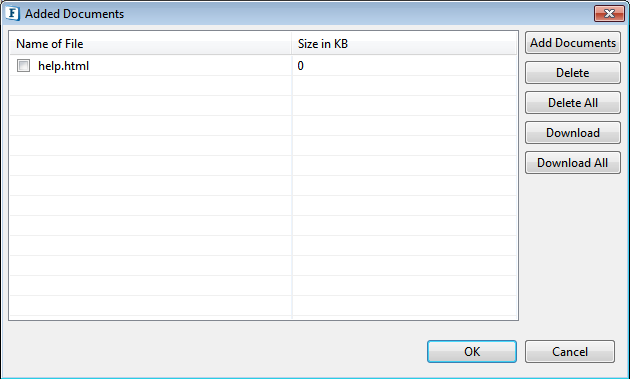
By default, a blank HTML file will be present in the dialog box.
-
Click the Add Documents button, then browse to the saved document.
To edit the blank document seen in the dialog box, click Download, edit the file and re-add the document. Overwrite it upon prompting.
Options in the dialog box, which are intuitive in nature are tabulated below.
|
Option |
Description |
|
Add Documents |
To add the document or documents with the relevant information from the location where it is saved. |
|
Delete |
To remove the selected document from the Event Process. |
|
Delete All |
To remove all documents attached to the event process. |
|
Download |
To download the selected document to a specific location. |
|
Download All |
To download all documents attached to the event process to a specific location. |