
The document tracking feature is configured as part of FES to track SBW events into the database running within Enterprise Server.
Viewing and Configuring the SBW Manager properties
Configuring the SBW Manager properties in eStudio
To view or configure the database, perform the following actions on the Profile Management perspective:
-
Load the profile and navigate to FES > Fiorano > Esb > Sbw > SBWManager. The Properties of SBWManager dialog box on the right displays all the database properties along with their default values.
Property values are editable only for inactive profile nodes. To edit an active profile (a running server), stop the server so that the values become editable.
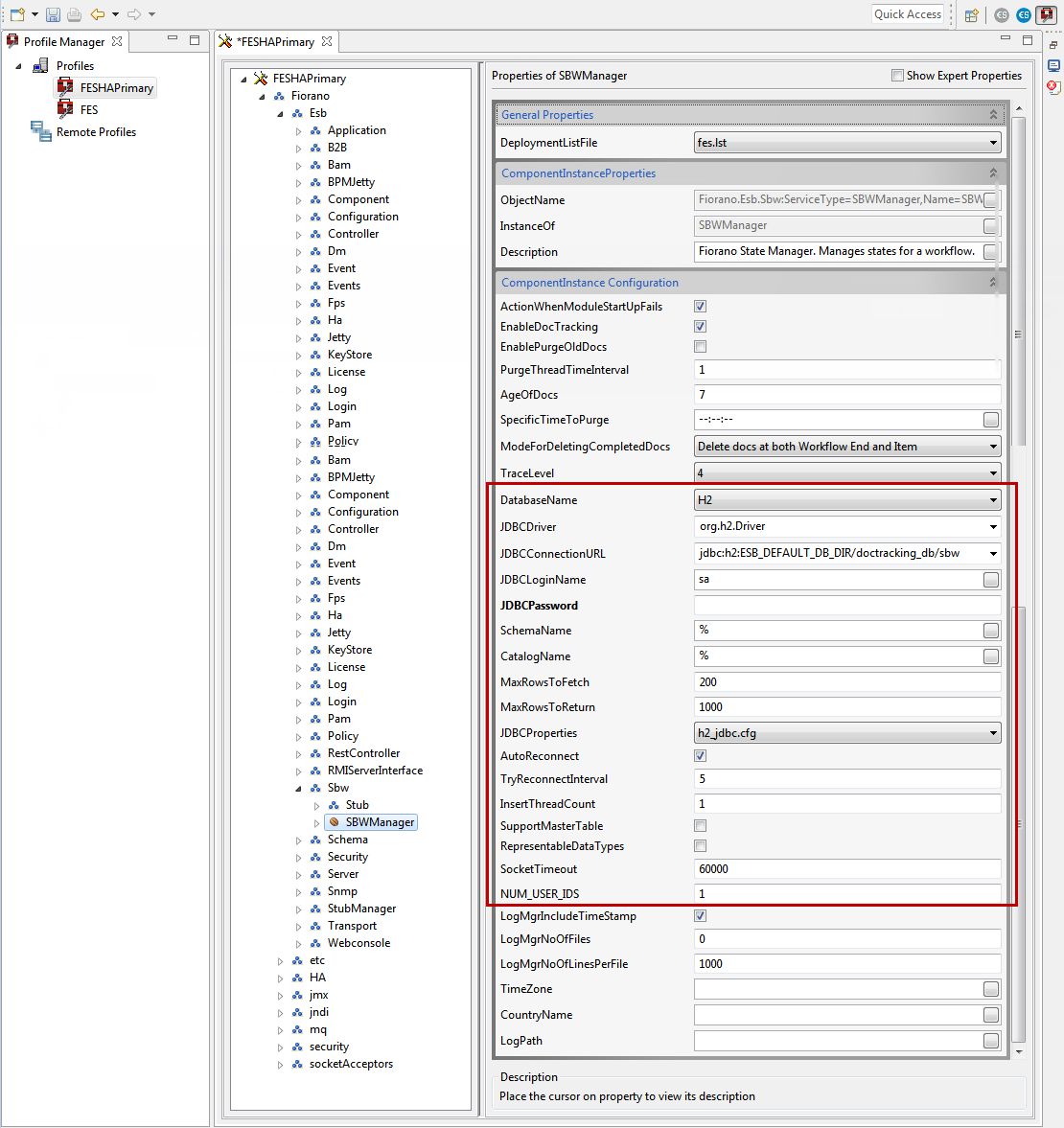
Refer to the Configuring SBW Database | id (12.2)ConfiguringSBWDatabase SBWDatabasePropertydescriptions for descriptions of the SBW database properties.
-
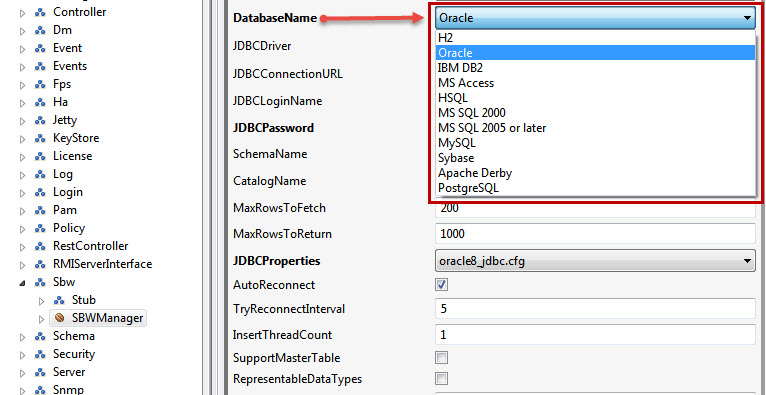
Select the required database from the Database Name property drop-down and modify values of other properties too accordingly.
-
Click the Save button or press CTRL+S to save the profile changes.
Configuring SWB Database in Fiorano Dashboard
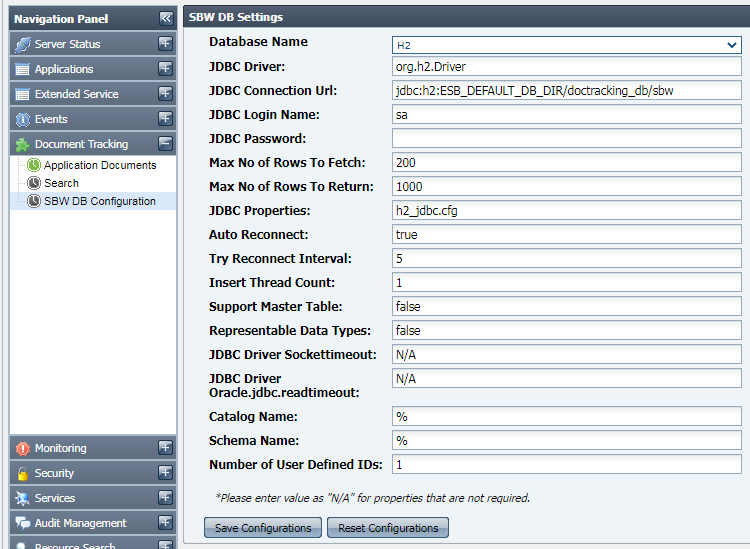
In the left navigation panel, go to Document Tracking > SBW DB Configuration, provide the database-specific values, click the Save Configurations button and restart the server.
1. After configuring a profile to use some database, other than the default database, jdbc driver for that database needs to be added under <java.classpath> tag in server startup configuration file (either $FIORANO_HOME/esb/server/bin/server.conf or $FIORANO_HOME/esb/fes/bin/fes.conf, whichever is applicable) before starting Enterprise server.
2. Use the same settings to connect to the DB when using a third-party tool. All the database queries used for retrieving workflow related data is kept in sbwdml.sql file.
3. When using MS SQL for document tracking, mssql_jdbc.cfg may need to be configured according to the database driver being used. MSSql 2000 driver follows SQL 99 conventions which quote the SQLState string for table not found exception as 42S02. On the other hand, MSSQL 2005 driver follows XOPEN SQLState conventions which quote the same SQLState string as S0002. By default, all fes profiles are configured according to the standards followed by MSSql 2000 driver. If someone uses MSSql 2005 database or uses MSSql 2005 driver for MSSql 2000 (2005 driver is backward compatible with 2000 driver, hence it can be used), then the file has to be reconfigured accordingly.
It is strongly recommended that the user employ a commercial-grade DB in a production system.
For file-based databases like apache and HSQL, the default location is in the ESB_USER_DIR (which is set in fiorano_vars script). Provide the complete path with these variables resolved when using the JDBC URL in a third party tool.
The default H2 db JDBC URL is configured as ESB_DEFAULT_DB_DIR/doctracking_db;create=true which resolves to ESB_USER_DIR/EnterpriseServers/<profilename>/FES/doctracking_db and further into something like C:\Documents and Settings\All Users\runtimedata\esb\<BUILD_NUMBER>\EnterpriseServers\FES\doctracking_db depending on the actual settings.
SBW Database Property descriptions
|
Database Name |
JDBC Driver |
JDBC Connection URL (Default Formats) |
JDBC Properties |
|
H2 |
org.h2.Driver |
jdbc:h2:ESB_DEFAULT_DB_DIR/doctracking_db/sbw |
h2_jdbc.cfg |
|
Oracle |
oracle.jdbc.driver.OracleDriver |
jdbc:oracle:thin:<ip-address>:<port>:<databaseName> |
oracle8_jdbc.cfg |
|
IBM DB2 |
sun.jdbc.odbc.JdbcOdbcDriver |
jdbc:odbc:sample |
db2_jdbc.cfg |
|
MS Access |
sun.jdbc.odbc.JdbcOdbcDriver |
jdbc:odbc:Driver={Driver do Microsoft Access (*.mdb)};DBQ=D:\\tif\\bin\\sp\\sbw.mdb |
msaccess_jdb.cfg |
|
HSQL |
org.hsqldb.jdbcDriver |
jdbc:hsqldb:ESB_DEFAULT_DB_DIR/doctracking_db/sbw |
hsql_jdbc.cfg |
|
MS SQL 2000 |
com.microsoft.jdbc.sqlserver.SQLServerDriver |
jdbc:microsoft:sqlserver://<ip-address>:<port>;SelectMethod=Cursor |
mssql_jdbc.cfg |
|
MS SQL 2005 or later |
com.microsoft.sqlserver.jdbc.SQLServerDriver |
jdbc:sqlserver://<ip-address>:<port>;databaseName=<databaseName>;SelectMethod=Cursor |
mssql_jdbc.cfg |
|
MySQL |
|
|
mysql_jdbc.cfg |
|
Sybase |
com.sybase.jdbc2.jdbc.SybDriver |
jdbc:sybase:Tds:<ip-address>:<port>/<databaseName> |
sybase_jdbc.cfg |
|
Apache Derby |
org.apache.derby.jdbc.EmbeddedDriver |
jdbc:derby:ESB_DEFAULT_DB_DIR/doctracking_db/sbw;create=true
|
derby_jdbc.cfg |
|
Postgre SQL |
org.postgresql.Driver |
jdbc:postgresql://<ip-address>:<port>/<databasename> |
pgsql_jdbc.cfg |
Descriptions of common properties are listed below:
|
Properties |
Descriptions |
Default Value |
|
JDBC Login Name |
Username to be used for jdbc database connection |
<DB dependent> |
|
JDBC Password |
Password to be used for jdbc database connection |
<DB dependent> |
|
Scheme Name |
By default, the schema name will be %, i.e., all schemas are searched. Schema name is case sensitive |
% |
|
Catalog Name |
By default, the catalog name will be %, all catalogs. Catalog Name for MS SQL should be configured as database name. |
% |
|
Max Rows To Fetch |
Maximum No Of Rows to Fetch. |
200 |
|
Max Rows To Return |
Maximum No Of Rows to Return. |
1000 |
|
Auto Reconnect |
Boolean to specify whether SP should try for reconnection with DB automatically. |
Enable/Disable |
|
Try Reconnect Interval |
Interval (in secs) after which SP tries to reconnect with DB in case of a break in connection. |
5 |
|
Insert Thread Count |
Number of threads used for inserting SBW data into the database. |
1 |
|
Support Master Table |
Enable if backward compatibility with earlier SBW schema (1001) is required. |
Enable/Disable |
|
Representable Data Types |
Enable to store MESSAGE in representable data format. |
Enable/Disable |
|
Socket Timeout |
Read timeout while reading from the socket. |
|
|
Num User IDs |
Number of user-defined document IDs the user wants to use in the setup.
|
1 |
Points to Note
1. After configuring a profile to use some database, other than the default database, jdbc driver for that database needs to be added under <java.classpath> tag in server startup configuration file (either $FIORANO_HOME/esb/server/bin/server.conf or $FIORANO_HOME/esb/fes/bin/fes.conf, whichever is applicable) before starting Enterprise server.
2. Use the same settings to connect to the DB when using a third-party tool. All the database queries used for retrieving workflow related data is kept in sbwdml.sql file.
3. When using MS SQL for document tracking, mssql_jdbc.cfg may need to be configured according to the database driver being used. MSSql 2000 driver follows SQL 99 conventions which quote the SQLState string for table not found exception as 42S02. On the other hand, MSSQL 2005 driver follows XOPEN SQLState conventions which quote the same SQLState string as S0002. By default, all fes profiles are configured according to the standards followed by MSSql 2000 driver. If someone uses MSSql 2005 database or uses MSSql 2005 driver for MSSql 2000 (2005 driver is backward compatible with 2000 driver, hence it can be used), then the file has to be reconfigured accordingly.
It is strongly recommended that the user employ a commercial-grade DB in a production system.
For file-based databases like apache and HSQL, the default location is in the ESB_USER_DIR (which is set in fiorano_vars script). Provide the complete path with these variables resolved when using the JDBC URL in a third party tool.
The default H2 db JDBC URL is configured as ESB_DEFAULT_DB_DIR/doctracking_db;create=true which resolves to ESB_USER_DIR/EnterpriseServers/<profilename>/FES/doctracking_db and further into something like C:\Documents and Settings\All Users\runtimedata\esb\<BUILD_NUMBER>\EnterpriseServers\FES\doctracking_db depending on the actual settings.