
To clear the Peer Server database of the default profile (that is profile1), run the clearDBServer.bat executable file present in the <fiorano_installation_dir>\esb\server\bin folder or browse to this location and execute the following script:
clearDBServer.bat/.sh -mode fps
The script by default clears the database of the Peer Server if an argument mode is not provided.
To clear the Peer Server database of a specific profile (other than the default profile), double-click the clearDBServer.bat file present in the <fiorano_installation_dir>\esb\server\bin folder or browse to this location and execute the following script with the profile option as shown below:
clearDBServer.bat/.sh -mode fps -profile <profilename>
The following operations are available when this script is executed from which you may choose the option of your preference:
|
Operation |
Description |
|---|---|
|
1. File BasedDatastore |
Clears the local cache of the Peer server. |
|
2. Security Datastore |
Clears the Peer server's ACLs (Access Control Lists) and they will be recreated next time the peer starts. |
|
3. Admin Datastore |
Clears the admin objects, that is, the JMS connection factories queues and topic destinations. |
|
4. Cached Component Store |
Clears all the cached components stored in the Peer Server‘s runtime storage. |
|
5. All |
Clears all five of the above. |
Select the preferred number (from 1 to 5) corresponding to the datastore that needs to be cleared.
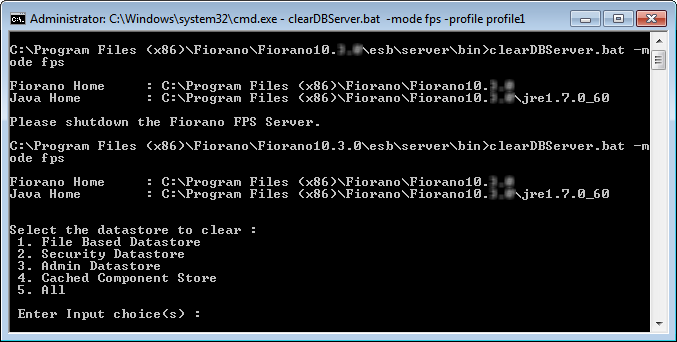
Figure 2: Options to clear datastore
Ensure that the Peer Server is shut down. If not you will get a message prompting to do the same (as in the figure above—"Please shutdown the Fiorano FPS Server")
This script can be executed in Quiet Mode as follows (sample):
clearDBServer.bat -mode fes -profile profile1 -dbPath <DB Directory path> -q 1,2
-
-mode - to clear fps or fes runtimedata
-
-dbPath - runtime data directory for the profile
-
-profile - profile name for which runtimedata is to be cleared
-
-q - to run the script in quiet mode.
You can provide comma separated option values to the argument (as in the above sample script). Absence of an argument leads to the assuming the default option—option 5, ‘ALL’.