
Preliminary Steps
To provide Named Configuration support in custom Microservices, firstly, follow the steps mentioned in the Using eStudio CPS for Custom Microservices section.
Download the sample FileNamedConfig microservice zip file and import the microservice file to the Project Explorer in eStudio to refer the sample codes used, classes added etc.
After completing the above exercise, follow the below sections to add Named Configuration support in Custom Components.
New Classes to be added
New classes/files to be added to the component to support Named Configurations in UI and Runtime are:
|
Class |
Description |
|---|---|
|
FileConfiguration.java |
Model named configuration class |
|
FileConfiguration.xsd |
Schema for named configuration (in the same folder as named configuration) |
|
package-info.java |
To support (de)serializing of named configuration (in the same folder as named configuration) |
|
ConfigLauncher.java |
Class to support UI for named configuration.
|
|
FileConfigurationEditor.java |
|
|
FileConfigurationUI.java |
|
|
resources/namedConfigurations.xml |
Used to define the named configuration in Configuration Repository view. |
Changes to existing classes/files
-
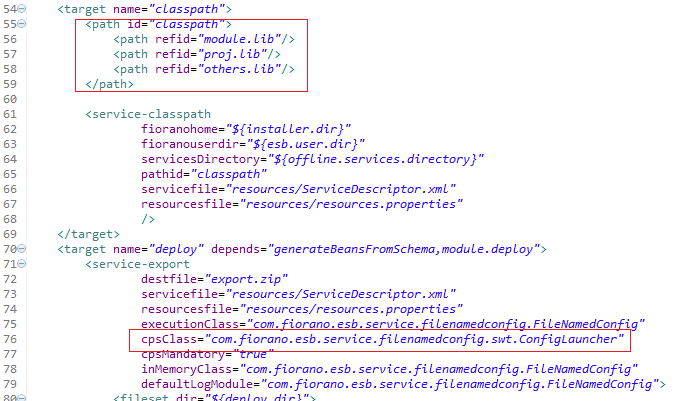
In %COMPONENT_HOME%\common.xml, modify the classpath and CPS launcher class.
-
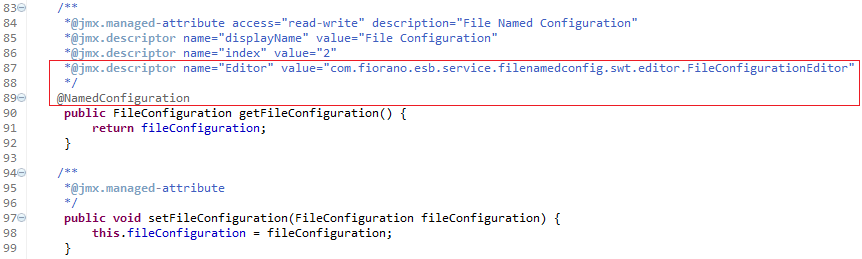
In the PM class where the named configuration is used, create getter and setter for the named configuration with usual jmx.descriptors and a new descriptor 'Editor'.
An annotation, "com.fiorano.services.common.annotations.NamedConfiguration" should be added to the getter indicating that the returned object is a Named Configuration
-
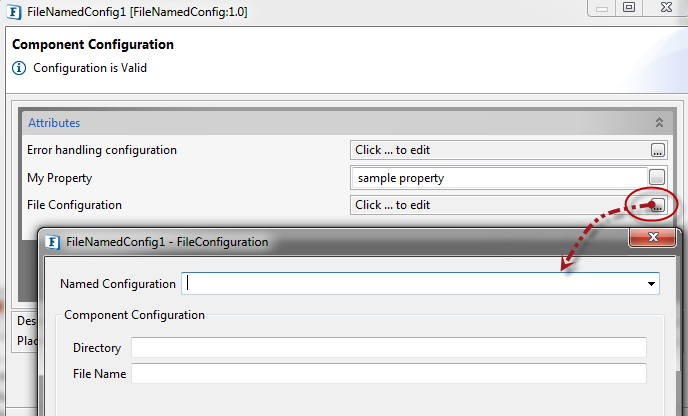
Provide the name and details of the configuration in the FileNamedConfig CPS.
-
For the named configuration to be used in runtime, the service class which extends com.fiorano.edbc.framework.service.AbstractInmemoryService should be modified by overriding updateNamedConfigurations() method as follows:
Java@override protected void updateNamedConfigurations() throws Exception { FileNameConfigPM config = (FileNamedConfigPM) getConfiguration(); if(config == null) { return; } updateNamedConfiguration(config.getFileConfiguration(), NamedConfigConstants.RESOURCE_CONFIG_TYPE); } -
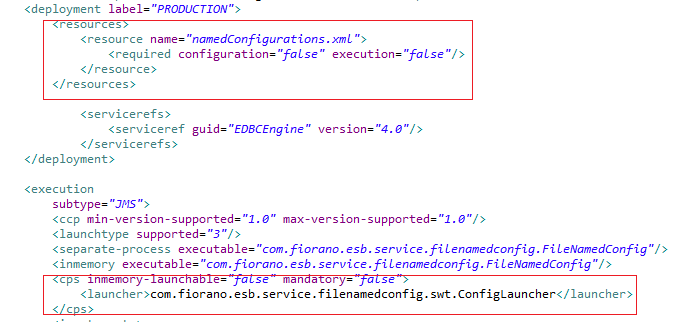
In the resources/ServiceDescriptor.xml file, make the following changes.
-
Register the component again to see the changes in the CPS and runtime.