
In the password grant type, the user provides their resource server credentials (username/password) to the client, which sends across an access token request to the API management. This grant type is ideally used when the request is generated from a reliable source.
After configuring the OAuth Token End Point policy, provide the following parameters in the Postman and click the Send button to get the access token:
-
Method: POST.
-
URL: Project proxy URL.
-
Query Parameters:
-
-
form-urlencoded parameters:
-
username: The resource owner username.
-
password: The resource owner password.
-
-
-
scope: The possible scope or list of permissions that are requested. This parameter is OPTIONAL. Example: READ,WRITE etc.
curl -X POST 'http://192.168.2.134:1860/otep/1.0?grant_type=password' -H 'Content-Type: application/x-www-form-urlencoded' -H 'cache-control: no-cache' -d 'username=admin&password=passwd'
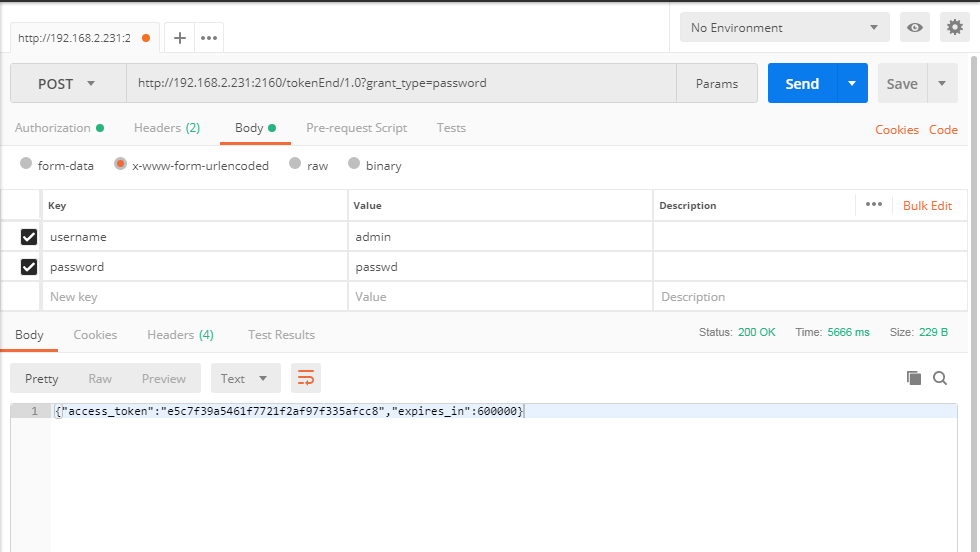
After receiving the access token, refer the Accessing protected resources using Access Token section to see how to access protected resources.