
To add an OAuth Token End Point project, click the Add icon and click the OAuth Token End Point option.
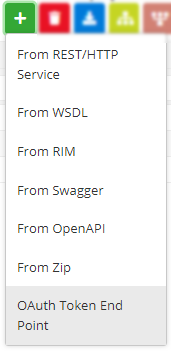
Figure 1: Navigating to create a project using OAuth Token
Enter values for attributes by following descriptions in the table below.
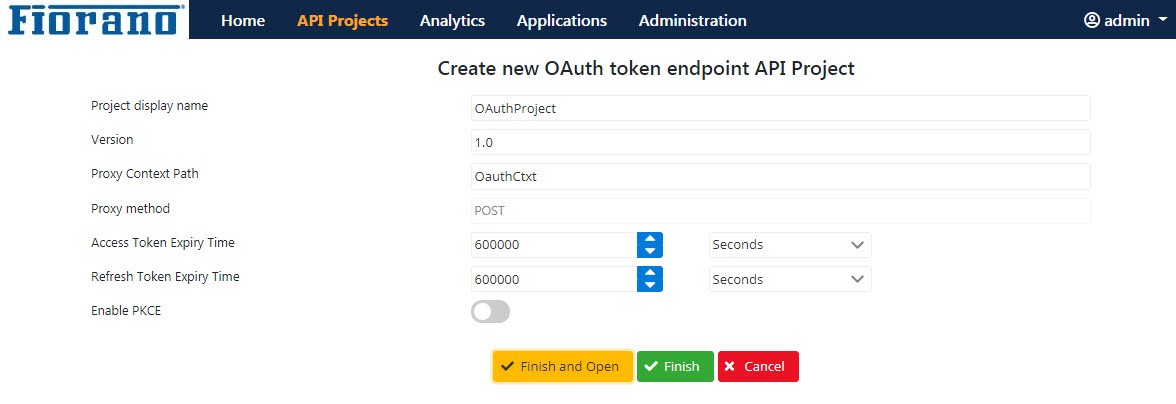
Figure 2: New OAuth Token End Point dialog box to provide OAuth details
|
Property |
Description |
|
Project display name |
Provide a name to act as Project ID to identify the project. |
|
Version |
Revision number of the project, for example, 1.0 for a project being newly added and 1.1 or 2.0 for the next revision. |
|
Proxy context path |
This is a text used to combine with the version number to act as an identifier to map with a particular deployed project. The proxy resolves context path mappings prior to applying any matching policies (explained in subsequent topics).
|
|
Proxy method |
HTTP method used by the Backend Service to send requests. Oauth uses only the POST method which will be applied by default. POST method submits data to be processed to a specified resource
|
|
Access token expiry time |
Duration of time till the Access Token is valid. After this time limit, the token will not work. |
|
Refresh token expiry time |
|
|
Enable PKCE |
To enable Proof Key for Code Exchange when OAuth2.0 authorization code grant is used. |